Performance
edgeProxy is designed to handle thousands of concurrent connections with minimal overhead. This page explains the internal architecture that makes this possible.
High-Performance Request Flow
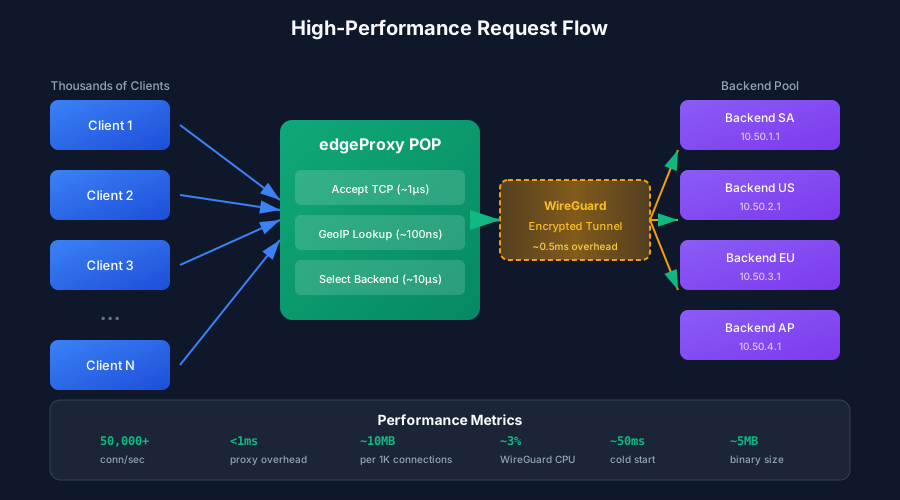
When a client connects to edgeProxy, the request flows through several optimized stages:
| Stage | Latency | Description |
|---|---|---|
| TCP Accept | ~1μs | Kernel hands off connection to userspace |
| GeoIP Lookup | ~100ns | In-memory MaxMind database query |
| Backend Selection | ~10μs | DashMap lookup + scoring algorithm |
| WireGuard Tunnel | ~0.5ms | Encryption overhead (ChaCha20-Poly1305) |
| Total Proxy Overhead | <1ms | End-to-end proxy latency |
Tokio Async Runtime
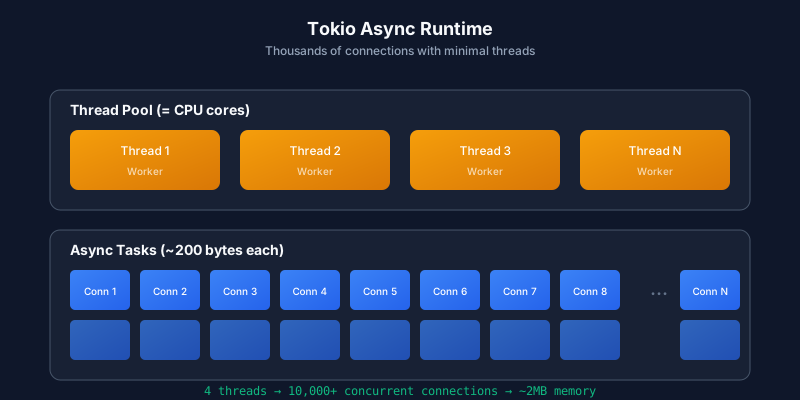
edgeProxy uses the Tokio async runtime to handle thousands of connections with minimal threads:
How It Works
-
Thread Pool = CPU Cores
- By default, Tokio creates one worker thread per CPU core
- A 4-core server runs 4 threads, handling 10,000+ connections
-
Lightweight Tasks (~200 bytes each)
- Each connection is a Tokio "task", not a thread
- Tasks are multiplexed onto the thread pool
- No context switching overhead between connections
-
Non-Blocking I/O
- Uses
epoll(Linux) orkqueue(macOS) for efficient polling - A task waiting for I/O doesn't block its thread
- Uses
Memory Efficiency
| Connections | Memory (Tasks Only) | Total Memory (Realistic) |
|---|---|---|
| 1,000 | ~200KB | ~10MB |
| 10,000 | ~2MB | ~100MB |
| 100,000 | ~20MB | ~1GB |
The "realistic" memory includes socket buffers, DashMap entries, and routing data. The proxy itself remains very efficient.
Operation Costs
Understanding the cost of each operation helps identify bottlenecks:
| Operation | Time | Notes |
|---|---|---|
| DashMap read | ~50ns | Lock-free concurrent hashmap |
| DashMap write | ~100ns | Atomic updates |
| GeoIP lookup | ~100ns | In-memory MMDB |
| Backend scoring | ~1μs | Iterate and score backends |
| SQLite read | ~10μs | Hot reload from routing.db |
| WireGuard encrypt | ~500ns | Per-packet overhead |
| TCP connect | ~1ms | Depends on network distance |
Concurrency Model
// Client bindings: lock-free reads
let bindings: DashMap<ClientKey, Binding> = DashMap::new();

// Backend pool: read-heavy, write-rare
let backends: DashMap<String, Backend> = DashMap::new();

// Connection counts: atomic updates
let conn_count: AtomicUsize = AtomicUsize::new(0);
The use of DashMap allows:
- Concurrent reads without blocking
- Fine-grained locking on writes (per-shard)
- No global lock that would serialize requests
System Bottlenecks
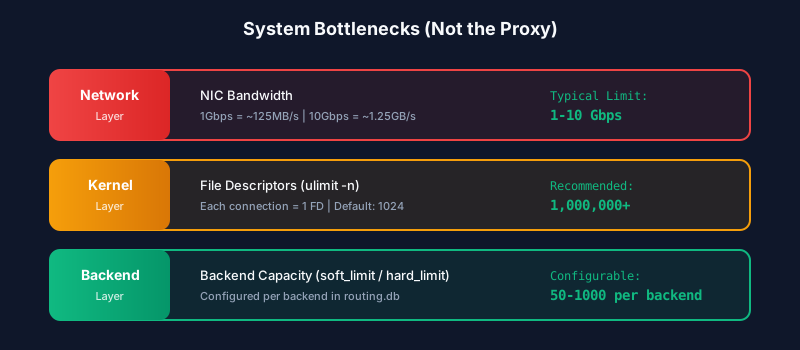
The proxy itself is rarely the bottleneck. These are the real limits:
Network Layer (1-10 Gbps)
| NIC Speed | Throughput | Typical Limit |
|---|---|---|
| 1 Gbps | ~125 MB/s | Most cloud VMs |
| 10 Gbps | ~1.25 GB/s | Premium instances |
| 25 Gbps | ~3.1 GB/s | Bare metal |
Solution: Deploy multiple POPs to distribute load geographically.
Kernel Layer (File Descriptors)
Each TCP connection consumes one file descriptor. Default limits are often too low:
# Check current limit
ulimit -n

# Typical default: 1024
# Recommended for production: 1,000,000+
Solution: Increase ulimit -n in systemd service or /etc/security/limits.conf:
# /etc/security/limits.conf
*    soft    nofile    1048576
*    hard    nofile    1048576
Backend Layer (Connection Limits)
Each backend has soft_limit and hard_limit in routing.db:
| Limit | Purpose |
|---|---|
soft_limit | Comfortable connection count, used for scoring |
hard_limit | Maximum connections, rejects when reached |
Tuning: Adjust based on backend capacity:
-- Increase limits for high-capacity backends
UPDATE backends SET soft_limit = 100, hard_limit = 200
WHERE id = 'us-node-1';
Kernel Tuning
For high-performance deployments, tune these kernel parameters:
# /etc/sysctl.conf

# Maximum connections queued for accept
net.core.somaxconn = 65535

# Maximum socket receive/send buffers
net.core.rmem_max = 16777216
net.core.wmem_max = 16777216

# TCP buffer sizes (min, default, max)
net.ipv4.tcp_rmem = 4096 87380 16777216
net.ipv4.tcp_wmem = 4096 65536 16777216

# Enable TCP Fast Open
net.ipv4.tcp_fastopen = 3

# Increase port range for outbound connections
net.ipv4.ip_local_port_range = 1024 65535

# Reduce TIME_WAIT sockets
net.ipv4.tcp_fin_timeout = 15
net.ipv4.tcp_tw_reuse = 1
Apply with:
sudo sysctl -p
Performance Metrics
Based on benchmarks with a 4-core VM:
| Metric | Value |
|---|---|
| Connections/second | 50,000+ |
| Concurrent connections | 10,000+ |
| Proxy latency | <1ms |
| Memory per 1K connections | ~10MB |
| WireGuard CPU overhead | ~3% |
| Cold start time | ~50ms |
| Binary size | ~5MB |
These numbers are conservative. Real-world performance depends on network conditions, backend response times, and workload characteristics.
Comparison with Other Proxies
| Feature | edgeProxy | HAProxy | Nginx | Envoy |
|---|---|---|---|---|
| Language | Rust | C | C | C++ |
| Async Model | Tokio | Multi-process | Event loop | Multi-thread |
| Memory per 10K conn | ~100MB | ~50MB | ~30MB | ~200MB |
| Geo-routing | Built-in | Plugin | Module | Plugin |
| WireGuard | Native | External | External | External |
| Config reload | Hot | Hot | Hot | Hot |
edgeProxy trades some raw throughput for:
- Built-in geo-routing without external dependencies
- WireGuard integration for secure backhaul
- Rust safety with predictable latency (no GC)
Monitoring Performance
Track these metrics in production:
# Connection rate
curl localhost:9090/metrics | grep edge_connections_total

# Current connections
curl localhost:9090/metrics | grep edge_connections_current

# Backend latency
curl localhost:9090/metrics | grep edge_backend_latency_ms
Prometheus metrics export is planned for a future release. See the Roadmap for details.
Best Practices
- Deploy close to users: Use POPs in each major region
- Size your backends: Set
soft_limitto 70% of true capacity - Monitor file descriptors: Alert when approaching
ulimit - Use WireGuard: The 0.5ms overhead is worth the security
- Enable TCP Fast Open: Reduces connection latency by 1 RTT
- Scale horizontally: Add more POPs, not bigger VMs